Monday, February 28, 2011

Kindle - A must-have device.

One week ago I received my Kindle 3 and it is proving to be purchase of the year already. No wonder there is not a single negative review on this e-reader on the net, this thing is just WOW - pure value for money for those who like to read, are studying or who keep lots of documents as reference.
Here are a the steps for those who want to quick start with their Kindle:

So, when you receive your Kindle, the first thing to do is to have it registered with Amazon.
You either connect to Wifi, have it registered automatically or access the 'Manage Your Kindle' page on Amazon, where you will be asked to enter the serial number of the device (the S/N is viewable in the Settings on your Kindle). I used the second option here.


You can now purchase your book directly from Amazon or load it with your personal PDF files.
Since the Kindle 3 now has a native PDF support, you just have to connect it via USB to a PC and copy the files in the 'Documents' folder.
I recommend reading your pdf files in landscape view. This will minimize zooming and scrolling over to read one page.
When you register your Kindle, you are offered two mail addresses: You use the @kindle.com one to send documents to your Amazon account, and you can have them delivered via wireless to your device.
When sending documents to the @free.kindle.com address, Amazon will freely convert them into Kindle version and send them back to your registered mail address within minutes, if not seconds.


Lastly purchasing books on Amazon is pretty much straightforward. You just have to look for the Kindle version and finalize your order by  of course paying for it.
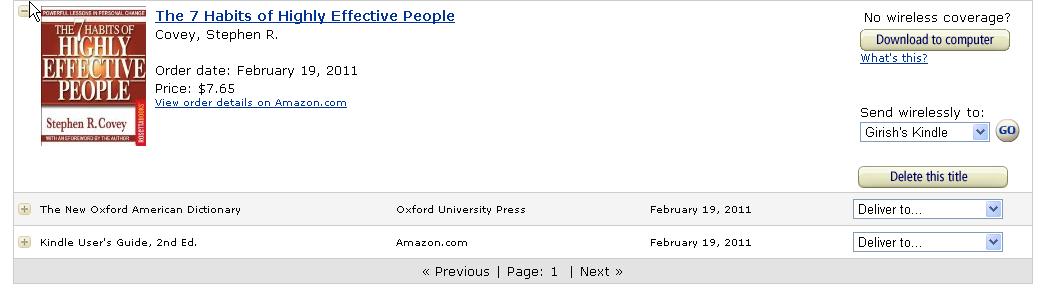
Again in the 'Manage Your Kindle' page you will have a list of all books ordered. You can download your ebooks on your computer first or send it via Wifi to your Kindle.

Now that you know the basics you're ready to go. Happy reading!

Monday, January 17, 2011

154 words

16 days already gone in 2011 and I finally decide to write down my New Year's resolutions! Well, am writing them somewhere else, not here!
However, since one of them is about blogging, I thought I might as well share it to you.
Like many of us, on 1st January we woke up and took the resolution to blog more this year. But we all agree that writing takes time, a lot of time.. so does reading!
So, this year I've decided to write more posts but with less words. It doesn't mean I will be saying less things, but rather communicate things effectively. With thousands of blogs out there people tend to bypass long posts they come across and move to more readable ones - and this is what I do too :)
This year, let us all post more, keep them brief and to the point, and be happy in the blogosphere.

Tuesday, September 7, 2010

Why is Knowledge Sharing important?

Patrick Lambe is Principal Consultant at knowledge management consulting firm Straits Knowledge. He is a brilliant KM blogger and has been writing on topics such as Knowledge Sharing, Communities, Learning, Enterprise 2.0 and so on.


In this 15 minutes video, Patrick tells us what Knowledge Sharing is, and the crucial benefits it brings to organizations.


Tuesday, August 17, 2010

List Master

There was a time I was quite messy about my things. They so easily got lost, I had things I forgot I had, couldn't remember what I had to do, forgot my password for blablabla.com, etc etc.
Since then, I decided to remedy those situations by keeping a list for everything I need not forget. The problem raised later when keeping track of all those lists became complicated. The current solution to this is the 13th item in the list below:


1. To do list
2. List of expenses (budget management)
3. List of Planned leaves for the year
4.  List of registered domains
5. Shopping list for the month
6. List of Registered Sites
7. List of Passwords
8. Kitchen inventory
9. List of movies
10. List of books in my library
11. List of must-read books
12. List of birthday dates
13. List of all my Lists!

Do you keep lists too?
Who keeps a 'Before I die' list? :-)